Working notes
What Each Course Platform Plan Actually Gates
Nobody upgrades a course platform because they wanted to. They upgrade because they hit something, and the thing they hit is almost never the thing the pricing page emphasises. This is a list of what each entry plan actually gates, read from the vendors' own pricing pages on 21 September 2026.
| Plan | Price (annual) | Products | Admin seats | Other caps |
|---|---|---|---|---|
| Kajabi Basic | $143/mo | 5 | 2 | 2,500 contacts |
| Teachable Starter | $29/mo | 5 | 1 | 7.5% transaction fee |
| Thinkific Basic | $40/mo | Unlimited courses | 1 | 10,000 current students |
| Podia Mover | $42/mo | 50 | None listed | 100 email subscribers, 500 videos, 25 spaces |
| Sensei Pro | $179/yr | No stated limit | WordPress users | Your hosting is the limit |
- Kajabi Basic5 products2 seats
- Teachable Starter5 products1 seat
- Thinkific BasicUnlimited courses1 seat
- Podia Mover50 productsNone listed
- Sensei ProNo stated limitWordPress users
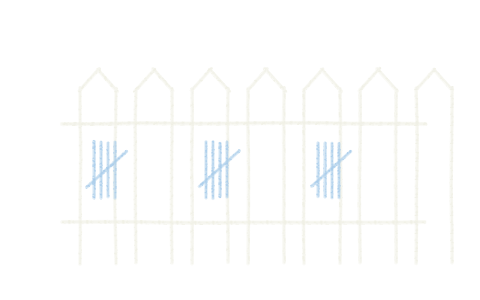
One five-bar gate = five products. One figure = one admin seat. Words are copied from the table above.
Products: the cap that sounds generous and is not
Five is the number on both Kajabi Basic and Teachable Starter. That is not five courses — it is five products, and most people's fifth product arrives faster than they expect.
Count what you might sell: the main course, a shorter introductory version, a recorded workshop, a template or worksheet bundle, a coaching offer, an annual community membership. That is six, and none of it is ambitious.
Podia Mover allows fifty, which is an order of magnitude more and genuinely accommodates a catalogue business. Thinkific allows unlimited courses on every paid tier, which removes the constraint entirely at the cheapest price point in the comparison.
If your plan involves selling several distinct things, this is the limit that decides your platform, and it decides it before you have sold anything.
Admin seats: the cap nobody plans for
Here is the one that catches people, because it has nothing to do with sales and everything to do with staffing.
- Thinkific: 1 on Basic, 2 on Start, 6 on Grow.
- Teachable: 1 on Starter, 1 on Builder, 5 on Growth.
- Kajabi: 2 on Basic, 11 on Growth, 26 on Pro.
- Podia: assistants appear on Shaker (1) and are unlimited on Earthquaker.
The moment a co-instructor, an editor, a virtual assistant or a business partner needs their own login rather than sharing your password, you are upgrading. On Teachable that jump is severe: Builder does not add a seat, so the first extra person takes you from $29 to $139 a month billed annually. On Thinkific it is $40 to $82.
Note that this trigger is completely decoupled from revenue. You can be forced onto a plan four times the price in a month where you sold nothing, because you hired a freelancer.
Contacts and subscribers: two different meters
Kajabi Basic includes 2,500 contacts, rising to 25,000 on Growth and 100,000 on Pro. A contact is anyone in your Kajabi CRM, which includes people who downloaded a free thing and never bought anything. On an all-in-one where email is the point, that cap is part of the product.
Podia includes 100 email subscribers on Mover, 500 on Shaker and 1,000 on Earthquaker, and charges separately beyond the allowance on a scale that climbs with list size. This is the most aggressive audience meter in the comparison and it catches people who are otherwise well within every other limit.
Thinkific caps current students at 10,000 across Basic, Start and Grow — a number very few will approach, but worth knowing because free enrolments count toward it and it does not rise as you climb the ladder.
Teachable gates on products and seats rather than on audience size at the tiers listed.
The pattern is worth noticing: the platforms that also sell you email charge you for the audience, and the ones that do not, do not. Neither is dishonest; they are different products.
Video and storage
Podia is the only platform in this comparison publishing an explicit video count on its entry tier: 500 videos on Mover, 1,000 on Shaker, unlimited on Earthquaker.
Elsewhere, storage limits are either absent from the pricing table or expressed in terms that require reading the documentation. If your course is video-heavy — ten or more hours of recorded material — check this specifically before committing, because it is the limit least likely to be visible at the point of purchase.
On a self-hosted Sensei setup there is no platform cap, only your hosting plan's, which is a different constraint and usually a harder one. Serving course video from shared hosting works until several students press play at once.
Which limit hits you first
It depends on what you are, and it is worth being honest about which of these you are before choosing.
A single-course seller with a growing list. The audience meter catches you. Podia Mover's 100 subscribers or Kajabi Basic's 2,500 contacts is the first wall. Thinkific, which does not meter your list because it does not sell you email, is the structural fit.
A catalogue seller. The product cap catches you. Five on Kajabi Basic or Teachable Starter is not enough. Thinkific's unlimited courses or Podia's fifty products is where you belong.
A small team. The seat cap catches you, and it catches you early and expensively on Teachable. Thinkific's ladder is gentler; Kajabi's Basic starts at two.
A high-volume solo seller. None of the caps catch you — the transaction fee does. That is a different problem, worked through in how course-platform transaction fees really work.
Limits that are not on any pricing table
Two more worth checking before you commit, because neither appears in a comparison chart.
Whether a limit is soft or hard. Some caps stop you doing the thing; others simply start charging. Podia's email allowance is the second kind — you are not blocked, you are billed. Kajabi's product limit is the first. The difference determines whether hitting the cap is an inconvenience or an invoice, and pricing pages rarely say which.
What counts toward the number. Thinkific's student cap counts current students, free enrolments included. Kajabi's contact allowance counts everyone in the CRM, buyers or not. If your marketing involves giving something away to build a list, both of those fill up considerably faster than your sales figures would suggest.
The planning rule
Pick the plan that fits the business you will have in twelve months, not the one you have today — but only where the difference is cheap. Where it is expensive, pick for today and accept that you will move.
Concretely: if you are choosing between Teachable Starter and Thinkific Basic and you expect to sell more than one thing, the $11 a month difference buys you out of the product cap permanently, and that is an easy yes. If you are choosing between Kajabi Basic and Kajabi Growth, the $56 a month difference is not worth paying against a limit you may never reach.
All five entry plans are priced against each other, with these limits alongside the fees, on the best online course platforms shortlist.
Questions from the back row
- How many courses can I sell on a cheap course platform plan?
- It varies enormously. Thinkific allows unlimited courses on every paid tier including the $40 entry plan. Podia Mover allows 50 products. Kajabi Basic and Teachable Starter each allow five. That five includes every distinct thing you sell, not just courses.
- How many students can I have on Thinkific?
- 10,000 current students on Basic, Start and Grow alike, as of 21 September 2026. The cap is on current students rather than lifetime enrolments, and free enrolments count toward it. It does not rise as you move up those three tiers.
- Which course platform limits admin users the most?
- Teachable — one admin seat on both Starter and Builder, so adding a second person means moving to Growth at $139 a month billed annually. Thinkific gives one on Basic and two on Start; Kajabi gives two on Basic and eleven on Growth.
- Do free students count toward a platform's limits?
- On Thinkific's current-student cap, yes. On Kajabi's contact allowance, anyone in your CRM counts whether they bought anything or not. If you run free lead-magnet courses at scale, price the plan against total enrolments rather than paying customers.
Every platform named above is graded side by side, with the monthly cost and the per-sale cut added together, on the best online course platforms shortlist. The marking criteria are published in full on how we grade.